SYLIN
The Way Projects Tools About Me GitHub ↗
← All projects
← os-tools Nagi →
Koan mascot 1.0 Koan· the foundation An opinionated, agent-native .NET meta-framework. Reference what the business needs; it joins the application, and Koan tells you what it chose and why. "Convention for speed; receipts for trust."
Koi mascot 1.0 Koi· the local substrate Let containers, applications and devices find, trust and talk across your private network. "It knows every stone in the pond by name."
Ghostlight mascot 0.8 Ghostlight· the guardian Let AI agents work in your signed-in Chromium browser while you watch and stay in control. Ghostlight MCP runs locally with compatible MCP clients. "A light left burning, so the halls stay safe."
Zen Garden mascot 0.2 Zen Garden· the estate Turn spare computers into a small, sovereign service garden. Ask for what you need; Zen Garden tends the machinery beneath it. "Old machines, tended into a garden."
Agyo mascot 0.1 Agyo· the capability layer Opt-in capabilities for Koan. Add more reach without giving the application a second architecture. "More reach, only when you ask."
Shiguchi mascot GRW Shiguchi· the joinery Open, testable contracts for what agent-facing capabilities mean. Learn the class once; change the vendor without changing the job. "The joint holds because the shapes agree."
Growing 0.0 os-tools· one API, many platforms Small Rust crates: one symmetric API over divergent platform mechanisms. "One shape over many machines."
Research RSR Hokora· a canon for companions A cognitive-architecture canon for artificial companions. "Notes toward a mind that keeps."
Research RSR Nagi· a companion you hold A breathing companion you hold, not watch. "Held, not watched."
Flagship · the foundation

Koan

v1.0 · stable .NET 10 release train

Start with the web and storage your first use case needs. When the business earns more - identity, tenancy, jobs, semantic search, an agent surface - add one reference. Koan composes it into the same application and tells you what it brought along.

Make oneInspect the source
$ dotnet new koan-web -o TodoApi
GitHub ↗Docs ↗
Convention for speed; receipts for trust.
Flagship · the local substrate

Koi

v1.0.0-rc.1 · release candidate

Koi brings containers, applications and devices into one local fabric: discoverable by useful names, able to establish trust, and ready to communicate across the boundaries that usually keep them apart.

See what's hereExplore Koi
$ koi mdns discover
GitHub ↗Docs ↗
It knows every stone in the pond by name.
Flagship · the guardian

Ghostlight

v0.8.0 · open-core · pre-1.0

Let your agent work in the browser you already use. The work stays visible, you keep the wheel, and the runtime stays local.

Install and try one read-only taskSee when Ghostlight fits
Paste into your MCP client Install the MCP server from https://sylin.org/ghostlight/install.md
GitHub ↗Docs ↗
A light left burning, so the halls stay safe.
Flagship · the estate

Zen Garden

v0.2.0 · active development

A spare computer becomes a named Stone. Ask the garden for MongoDB and it handles the manifest, hardware fit, storage, port and published connection details while the application stays about its own work.

Grow the first service
$ garden-rake offer mongodb
GitHub ↗Docs ↗
Old machines, tended into a garden.
Growing · the capability layer

Agyo

v0.1 · pre-1.0 · V1 stability in progress

When a Koan application needs GraphQL, scheduling, vector search, RAG or another advanced capability, add that intent without introducing a second framework around the domain.

Follow the V1 pathInspect the current source
GitHub ↗Docs ↗
More reach, only when you ask.
Growing · the joinery

Shiguchi

draft 0.2 · specification and toolkit seed

Teach an agent what a calendar, operator or sensor means once. Shiguchi gives each capability class a small, versioned contract and defines the observable behavior every implementation must prove.

Start with one profileExplore the draft
$ git clone https://github.com/sylin-org/shiguchi
GitHub ↗Docs ↗
The joint holds because the shapes agree.
Growing · one API, many platforms

os-tools

v0.0.2 · early

Small, dependency-light Rust crates that each present one identical API over the platform-native mechanism beneath - the same operation, done the same way, on Windows, macOS and Linux. The first is os-truststore: it installs a root certificate into the OS trust store, where the established crates in this space only read from it.

GitHub ↗
One shape over many machines.
Research · a canon for companions

Hokora

research

A research canon, not software: an architecture paper, a glossary, a graded bibliography and a stack of decision records for how an artificial companion might remember, attend, and hold a coherent sense of self over time.

GitHub ↗
Notes toward a mind that keeps.
Research · a companion you hold

Nagi

project birth

A paced-breathing companion built to be held rather than watched. A tuned, runnable prototype exists today. The shippable app is the next thing.

GitHub ↗
Held, not watched.
Reach for Koan when
  • You want a small web application with storage running before scaffolding becomes the project.
  • Identity, tenancy, jobs, search or agent access should join when the business case earns them.
  • Developers and agents need one compact grammar, with runtime decisions people can inspect.
Composable application development

A minute with Koan

01

Start useful

Reference the first capabilities, describe the domain, run. Day one is a persisted, queryable HTTP API - not a scaffold you now owe a refactor.

02

Grow by reference

Identity, tenancy, jobs, vector search, MCP: each arrives as one coherent path into the same model, with configuration only where a real choice exists.

03

Wonder later, not audit

When you wonder what happened underneath, the boot report, health endpoints and composition lockfile already know.

Composability is the product.

Every capability rides the same Entity grammar and one composition model, added in the order your domain requires - and every claim ships with the tests behind it.

◆Business at the center
Application code describes entities, rules and workflows. Koan owns the repeated mechanics that would otherwise bury them between infrastructure layers.
◆Reference = Intent
Start with web and storage. Add identity, tenancy, jobs, semantic search or MCP when the use case asks for them; each capability joins the same application model.
◆Complexity with receipts
Providers declare what they can do. Startup reports what composed, unsupported operations fail explicitly with a correction, and the lockfile makes architectural change reviewable.
The application grows by composition
Business domain + Web + Storage + Identity + Tenancy + Jobs + Search + MCP

Add only what the use case earns. The boot report, capability set and composition lock explain what each reference contributed.

What it looks like from where you sit

For the developer

Each small addition lands a working vertical slice - route, storage, rules and all - with no new architectural dialect to learn.

For the agent

A compact, stable grammar plus self-description - facts, entity catalog, lockfile - so agent context goes to the business, and agents work the same model under the same access rules as everyone else.

For DevOps

Startup reporting, live/ready health and a checked-in composition lock say what assembled and what changed since the last deploy, so a deploy holds no surprises.

For the architect

Capabilities join through shared boundaries. Provider differences are declared up front and tested by conformance kits, so what you learn in development still holds in production.

Make one

Install the template, generate an application, run it. What you get on the first run is a persisted, queryable HTTP API.

Create a Koan web application

$ dotnet new install Sylin.Koan.Templates && dotnet new koan-web -o TodoApi

The template brings the entity model, controller and storage the first use case needs.

Run it

$ cd TodoApi && dotnet run -- --urls http://localhost:5000

No DbContext, repository, schema script or endpoint mapping to write first.

Your first useful result

Ask the API the template just generated:

curl http://localhost:5000/api/todos

Entity, controller, done. The data you POST there is persisted, queryable, and still present after a restart.

Watch it grow

One application, growing in place. Nothing below is a second project or a parallel stack.

01

The whole application

`dotnet new koan-web` created exactly these three files.

Program.cs
var builder = WebApplication.CreateBuilder(args);

// bootstraps the framework and composes every capability you referenced
builder.Services.AddKoan();

var app = builder.Build();
await app.RunAsync();
Todo.cs
// the entire model. no table, no context, no mapping.
public sealed class Todo : Entity<Todo>
{
    public string Title { get; set; } = "";   // still just business
    public bool Done { get; set; }
}
TodosController.cs
[Route("api/todos")]
public sealed class TodosController : EntityController<Todo>;
// one declaration. CRUD, paging, queries and streaming project onto api/todos.

Two NuGet references, three files - and api/todos persists, queries and survives restarts. Storage here is local SQLite; the day the app outgrows it, remove that reference and add another adapter. The code above does not change.

02

Search by meaning

The generated project already carries Koan's agent skills. Want AI on your todos? Ask:

you say
$koan add semantic search for Todo
the agent answers
+ [Embedding(Template = "{Title}. {Notes}")]   // saves index meaning, locally
  public sealed class Todo : Entity<Todo>;

- public sealed class TodosController : EntityController<Todo>;
+ public sealed class TodosController : EntityController<Todo>
+ {
+     [HttpGet("search")]   // the controller you already have learns a verb
+     public async Task<IActionResult> Find(string q, CancellationToken ct)
+         => Ok(await Vector<Todo>.Search(await Koan.AI.Client.Embed(q, ct), topK: 10));
+ }

Presto - "something quick before the game" now finds the right chores. Computed entirely on your machine; no service, no key.

03

Pictures

you say
$koan add photo uploads, and give me a little gallery page
the agent answers
+ using Koan.Media;
+
+ public sealed class Photo : MediaEntity<Photo>
+ {
+     public string AlbumId { get; set; } = "";   // metadata beside your other entities
+ }
+
+ [Route("api/photos")]
+ public sealed class PhotosController : EntityController<Photo>;   // uploads, listing, serving
+
+ // plus Pages/Gallery.cshtml - a small uploads-and-grid page, ordinary ASP.NET Core

Originals land in storage, resized cards render on demand, identical files dedupe. UI was never the framework's job; capabilities were.

04

Let agents in

the agent answers
+ [McpEntity(Name = "todo", Description = "Work the team intends to finish")]
  public sealed class Todo : Entity<Todo>;   // same todo. now agents see it too.

Claude works these todos under the same rules your API enforces. Same model, every doorway.

Three sentences of intent. Everything else was already true.

Prefer typing? Every green diff is also the entire manual change.

Where it stands today

  • Koan 1.0 ships as a stable release train: every active package publishes to NuGet as Sylin.Koan.* under one compatibility contract, and dotnet new koan-web is the verified package-first journey.
  • Every capability carries a grade from a generated product surface - supported, demonstrated or unassessed - linked to the test suite that earned it.
  • AI runs local-first by design: Ollama, LM Studio and in-process ONNX today, with the whole stack able to run offline as a single NativeAOT binary.
Read the capability map →See the graded product surface →Walk the golden journey sample →
Make oneView the source
Local connectivity substrate

A minute with Koi

01

On your workstation

See the databases, development servers, containers and devices already around you, then give the ones that matter names that survive the next restart.

02

Across your homelab

Let native applications, containers and physical devices participate in the same local network without rebuilding the stack around a new control plane.

03

Inside a private fleet

Give people, scripts and agents one current picture of what can be found, trusted and reached.

Start by looking

Before Koi asks you to shape the network, let it answer one useful question: what is already here? Install the v1 release candidate for your platform, then look.

Linux or macOS

$ curl -fsSL https://raw.githubusercontent.com/sylin-org/koi/v1.0.0-rc.1/install.sh | KOI_VERSION=v1.0.0-rc.1 sh

Installs the current v1 candidate from its release archive and verifies the checksum.

Windows PowerShell

$ $env:KOI_VERSION='v1.0.0-rc.1'; irm https://raw.githubusercontent.com/sylin-org/koi/v1.0.0-rc.1/install.ps1 | iex

Uses the same pinned, checksum-verified release contract on Windows.

Now ask the network

Browse the local network now:

koi mdns discover

Discovery runs on its own. If the result earns a permanent place, keep Koi running and add useful names, trust and deeper connectivity in the order your network needs them.

Find. Trust. Connect.

Three outcomes, carried by one living view of the local environment. Use the part you need first; let the rest join as the network grows into it.

◆Find
Discover services over mDNS and DNS-SD, see containers as they arrive, and give local things useful .internal names. Lifecycle events keep the picture moving with the network.
◆Trust
Give local names and peers shared identity through a private certificate mesh, guided enrollment, native trust-store integration, renewal and diagnosis.
◆Connect
Let containers, host applications, devices, proxies, resolvers, monitors and agents participate through the interfaces that already make sense to them.
One service, from arrival to conversation
service appears -> found by a useful name -> trusted where needed -> connected across its boundary -> removed when it leaves

The same lifecycle is visible through the CLI, dashboard, APIs and MCP, so people, applications and agents are talking about the same network.

What it looks like from where you sit

For the builder

Describe what a service offers once. Koi carries discovery, naming and participation across operating systems and runtime boundaries.

For the operator

See arrivals, health, restarts and departures through one coherent local story while keeping the DNS, proxy and monitoring tools already in place.

For the agent

Begin with current environmental context instead of spending the first exchange probing ports, reading stale host files and guessing what is still alive.

Meet the v1 release candidate →Read why Koi exists →See the physical-network evidence →
See what's hereExplore KoiRead the v1 RC docs
Reach for Ghostlight when
  • The job needs a site where you are already signed in.
  • You want browser work to stay visible and interruptible.
  • Several page states, tabs, forms or evidence sources belong to one workflow.
Responsible browser automation

A minute with Ghostlight

01

Work where you are signed in

Use the Chromium profile that already has the session the job needs, without copying credentials into a separate browser service.

02

Watch and take over

The agent works in a dedicated visible tab group. Pause, interrupt, or use the browser yourself whenever you need to.

03

Recover and continue

Exact workspace identity and useful next steps help work survive ordinary page, tab, and connection changes.

Useful first. Responsible all the way through.

Ghostlight starts with the job: see the page, act in the browser, and return a compact result. Visibility, boundaries, and evidence belong to that same experience.

◆The browser where your work lives
Act in signed-in Chromium: navigate, fill forms, manage tabs, and read pages as structure or text.
◆A boundary you can understand
Begin wide open. When needed, enforce scopes, protect domains, explain denials, and record every call locally.
◆A system you can keep
The MCP connector, Rust service, browser connector, and extension run locally. The engine is open, governance is readable, and nothing phones home.
Local by construction
MCP client <-> ghostlight-mcp-connector <-> ghostlight service <-> ghostlight-browser-connector <-> extension <-> Chromium

The three executable roles and the extension run locally as the current user. No Ghostlight-hosted control plane sits in the runtime path.

What it looks like from where you sit

For you

One installer and visible, interruptible work.

For the agent

Stable schemas, compact results, and useful recovery guidance.

For reviewers

Local evidence, readable source, and an inspectable boundary.

Try it for real

Let your agent handle setup, or run the installer yourself. Both paths end at the same doctor check.

Let your agent install it

Copy the install prompt

It reads the canonical guide instead of guessing at client setup.

Prefer the terminal?

$ npx -y ghostlight install

Check the whole chain

$ npx -y ghostlight doctor

Doctor names anything missing.

Your first safe job
Open https://example.com/ in a new Ghostlight tab, summarize the page, and tell me which tab you used. Do not click, type, submit, or change the page.

You should see a dedicated Ghostlight tab group, the exact tab used, and a summary produced without a click, form write, or page change.

Try the fit, not a feature list

Four ways to try it

Start with the read-only check above. These four bounded recipes show the other jobs Ghostlight is built to carry without turning the page into a tool catalog.

01 Complete a safe launch briefSynthetic form work

Prompt

Open https://sylin.org/ghostlight/demo/brief/ in a new Ghostlight tab. This is a simulated form. Set Project to Moonlight Notes, Owner to Maya Chen, and Summary to "Turn field observations into a shared release brief." Enable Include screenshots and Keep data local, then select Create brief. Stop when the page confirms the brief is ready for review.

What you should see

A visible read, deliberate field changes, one submit action, and "Moonlight Notes is ready for review."

Success boundary

Only the synthetic Sylin demo changes. Nothing is sent or stored.

02 Read authenticated work without copying credentialsUser-chosen signed-in page

Prompt

Open [SIGNED-IN APPLICATION URL] in a new Ghostlight tab using my current browser session. Confirm the account or workspace name visible on the page, summarize the current page, and list the next available actions. Do not click, type, submit, or copy credentials.

What you should see

The chosen application opens with the browser profile session, and the answer reports visible context without changing the page.

Success boundary

The person chooses and confirms the account. Do not record or quote the result without permission.

03 Follow one exact browser-created childTab continuity

Prompt

Open https://example.com/ in a new Ghostlight tab. Add a temporary link labeled Open child proof that points to https://example.org/ and opens in a new tab, then click that link. Follow the browser-created child and report the title and URL of both the original and child tabs. Do not close either tab or change either site.

What you should see

One exact child becomes usable without a manual context refresh, while the source tab stays open.

Success boundary

The temporary DOM change stays in the disposable example.com tab. Ambiguous popups are refused rather than adopted.

04 Combine page, console, and network evidenceRead-only diagnosis

Prompt

Open https://sylin.org/ghostlight/demo/foundry/ in a new Ghostlight tab. Start console and network tracking, reload once so page-load events are captured, then inspect the page, console, and network buffers. Report any failed request or console error, distinguish observed evidence from inference, and recommend one next check. Do not modify the page.

What you should see

The answer separates page state, browser events, and inference. Finding no error is a valid result when the evidence is clean.

Success boundary

The single reload is explicit because console and network tracking begins when first requested.

Where it stands today

  • The trained browser schemas are stable and I am holding them steady. The interfaces around them will still change before 1.0.
  • Windows and Linux are verified end to end against live browsers. macOS builds and passes the full test suite in CI; its live-browser verification is still owed.
  • The Chrome Web Store serves Chrome adapter v0.8.0. Chrome adapter v0.8.0 covers Ghostlight service versions v0.8.x. Install the extension from the public listing.
Browser-control decision aid →Safe demo space →Open Trust Center →How it compares →
Try the safe demoCompare browser-control approachesView the source
Reach for Zen Garden when
  • You have thin clients, retired PCs or other capable machines that should be useful instead of becoming e-waste.
  • You want a handful of self-hosted services without hand-maintaining container commands, ports and hostnames.
  • You value local ownership, comprehensible infrastructure and the freedom to replace individual machines.
Regenerative local infrastructure

A minute with Zen Garden

01

Prepare a Stone

Boot the garden installer on a spare machine. It receives a name, an identity and a place in the garden.

02

Offer what you need

Name the service. A checked-in manifest carries the operational knowledge for selecting, placing and starting it.

03

Find it by meaning

Ask for MongoDB, not a remembered box. Rake returns the current location and a connection URI for people, scripts or agents.

A garden in the wild

Useful machines, working together.

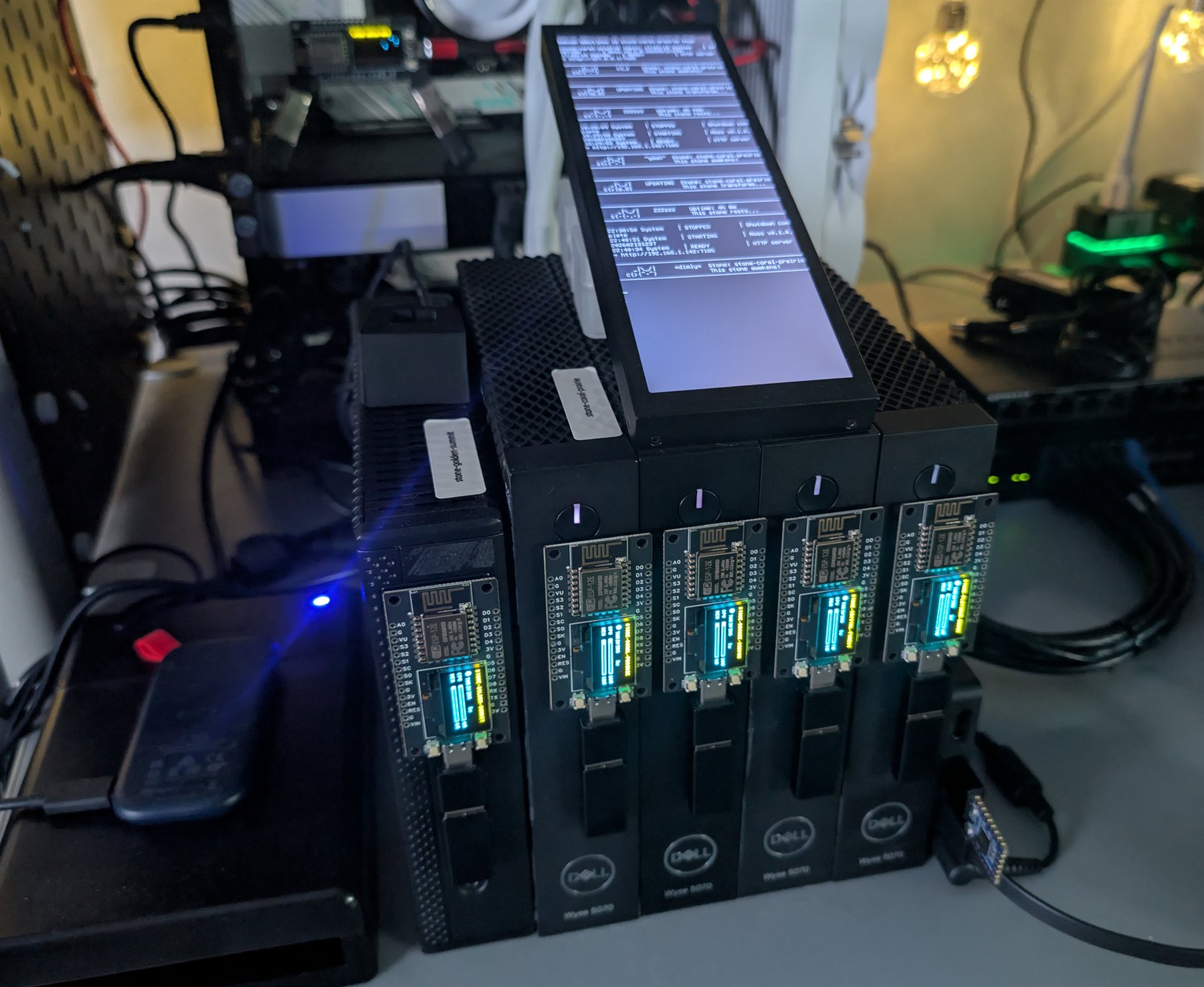
An operational Zen Garden on a workbench, with repurposed Dell thin clients, illuminated companion displays and a central status screen.
An operational Zen Garden test environment: repurposed thin clients and mixed hardware working as named Stones, with central status reporting and illuminated companions making the garden visible at a glance.

Useful hardware, tended as one garden.

Zen Garden starts with service intent, then carries that intent through placement, operation and discovery. The container is disposable; the offering name, configuration, data location, port and discoverability are what the garden remembers.

◆Machines become Stones
Retired PCs, thin clients and Raspberry Pis become named participants instead of e-waste. The garden is designed around replaceable hardware, not precious servers.
◆Services become offerings
A curated manifest expresses how a service should run. Moss negotiates hardware, storage and ports, then keeps the resulting runtime aligned with that intent.
◆Locations become answers
Applications and people ask for a service by what it is. Discovery supplies its current URI, and Koan can carry that intent as a zengarden:// resource.

What's inside

Curated offerings 51 checked-in service templates spanning databases, AI, networking, storage and more
Hardware negotiation compatibility, preferences, GPU capabilities and image fallbacks inform placement
Durable service intent persistent data paths and remembered ports survive managed-container recreation
Three service modes manage a Zen container, observe an existing service or publish an external one
Operational surfaces health, resources, logs, events, lifecycle commands and the Pulse terminal
Physical companions Cricket audio and Firefly displays give each Stone a voice in the room
Intent becomes infrastructure
spare machine -> named Stone -> offer manifest -> Moss -> running service -> connection URI

Moss tends the runtime on each Stone. Rake, scripts and agents inspect the same garden; Koan applications can resolve zengarden:// resources into current connection strings.

What it looks like from where you sit

For the builder

One service-shaped request replaces a page of container, storage, port and discovery plumbing.

For the agent

Compact commands plus JSON and URI output keep infrastructure work legible and composable.

For the operator

Pulse, health, events, logs and visible companions make the garden observable in software and in the room.

For the inheritor

Named offerings and checked-in manifests preserve why a service exists after its original machine is gone.

Grow one useful thing

Once a Stone is running Moss, two commands turn service intent into something an application can use.

Ask the garden for MongoDB

$ garden-rake offer mongodb

Zen Garden evaluates the offering and hardware, creates durable storage, negotiates a usable port and starts the managed runtime.

Receive its connection URI

$ garden-rake find mongodb --format uri

Discovery returns where the service is now, without making the application remember which Stone hosts it.

Then watch the garden tend

Open the live terminal view when you want the whole garden in sight:

garden-rake pulse

Pulse makes Stones, offerings and current state visible without turning ordinary service use into an operations dashboard.

Where it stands today

  • The offering lifecycle, discovery, operations and companion surfaces all run on a real mixed-hardware garden, and you can test them from source.
  • The USB creator builds an unattended Stone installer today. A signed turnkey image is still on my list.
  • Moss can rebuild a missing managed container on a surviving Stone. Cross-Stone state recovery, guarded update rollback and real high availability are what I am working on next.
Prepare a first Stone →Inspect the offering lifecycle →Meet the companions →
Grow the first serviceView the source
Reach for Agyo when
  • A Koan application needs an advanced capability without a parallel bootstrap, domain model or provider vocabulary.
  • A small application should gain something substantial without letting integration plumbing dominate its code.
  • Optional dependencies and their security cadence should remain outside Koan core until an application asks for them.
Optional capability layer

A minute with Agyo

01

Name the capability

The reference says what the application needs. Agyo carries the recurring registration, lifecycle and provider mechanics.

02

Keep one application

Entities, hooks, configuration and business behavior stay in Koan's familiar grammar instead of splitting into another integration layer.

03

See what joined

Capabilities participate in Koan's startup and operational vocabulary, so optional composition can remain inspectable.

Capability without a second architecture.

Agyo is where useful Koan-native capabilities can grow independently. Applications reference only what they need; the foundation stays lean and the resulting system stays recognizable.

◆Only when you ask
GraphQL, RAG, Vault, PGVector and other dependencies stay outside Koan core. The application references only the capability its next use case earns.
◆The same application grammar
Agyo joins AddKoan(), entities, hooks, configuration, health and startup reporting instead of creating another framework beside the application.
◆Independent by design
The one-way package boundary keeps Koan lean while optional capabilities move on the dependency, security and release cadence their job requires.

What's inside

Application interfaces GraphQL over Koan entities and duplex WebSockets exposed as .NET Streams
Application capabilities in-process scheduling, AI translation, canonical tagging and an OpenTelemetry baseline
Infrastructure adapters PostgreSQL pgvector search plus environment, configuration and HashiCorp Vault secret resolution
Intelligence toolkit RAG ingestion, provenance, retrieval, concept graphs, distillation, evaluation and corpus composition
Built with Agyo Librarian turns local repositories into cited code and documentation context over REST, UI and MCP
One application, optional reach
Koan application + chosen Agyo capability -> AddKoan() -> one composed runtime

Agyo depends on Koan's public packages; Koan never depends on Agyo. That one-way boundary keeps every capability optional and gives it an independent release and security cadence.

What it looks like from where you sit

For the developer

The capability arrives; the code you are left reading is still about your application.

For the agent

A known package and one composition grammar, in place of invented wiring.

For DevOps

Visible dependencies, health and provider choices, with defaults that are safe to ship.

For the architect

A controlled frontier that lets Koan stay coherent instead of growing into a monolith.

Follow Agyo toward V1

The capability source works and is testable today. Published packages and compatibility guarantees are part of the V1 work.

Explore the current source

$ git clone --branch dev https://github.com/sylin-org/agyo-tools

The repository contains the libraries, focused tests, decisions and live surface ledger. Building currently requires compatible Koan packages in its local feed.

The V1 first result

Reference one published capability in an existing Koan app and run it through the same AddKoan() composition. GraphQL is the clearest target: existing entities gain /graphql and /graphql/sdl without a second domain model.

Where it stands today

  • Twelve library projects pack from source, the principal composition paths have focused tests, and Librarian is a substantial runnable service assembled entirely from Agyo capabilities.
  • There is no NuGet release yet - the first Sylin.Agyo.* packages and a clean package-first path in are part of the V1 work. Follow the source if you want to track it; package IDs and APIs are open until that release.
  • Some boundaries are deliberate: scheduling stays in-process, GraphQL typing is still limited, the AI, vector and Vault paths need their providers running, and the full tool-using RAG loop is still ahead of me.
Read the Agyo charter →Inspect the surface ledger →Trace the current tests →
View the current sourceRead the architecture decisions
Reach for Shiguchi when
  • You build agents, hosts or workflows that should survive a change of provider without learning another tool dialect.
  • You publish an agent-facing capability and want a checkable contract rather than a self-described compatibility badge.
  • You need to adapt an existing server once, review the mapping and make every approximation or gap visible.
Capability Class Profiles

A minute with Shiguchi

01

Speak the capability

An agent targets an exact semantic identity such as calendar create-event instead of carrying every vendor's spelling and schema in working memory.

02

Know the claim

A compatibility statement names the exact profile, baseline, facets and fixture digest it passed. Prose can explain the contract; fixtures decide it.

03

Keep the ceiling

A frozen projection can welcome an existing server while its coverage manifest and passthrough surface preserve what the shared profile cannot express.

The joint holds because the shapes agree.

Shiguchi standardizes the small semantic surface agents can rely on, defines the behavior both sides must prove and leaves vendor-specific reach visible instead of sanding it away.

◆Profiles name the joint
An immutable Core baseline defines the capability's dependable floor. Optional facets add coherent jobs; namespaced Vendor fields preserve provider-specific reach with an explicit degradation story.
◆Fixtures prove the fit
Every conformance claim points to an exact suite and digest. Implementations and consumers must be tested through the same public MCP surface, so compatibility is observable rather than ceremonial.
◆Projection welcomes what exists
A model may draft a mapping once, but runtime meaning never depends on fresh inference. The reviewed capsule is frozen, upstream-pinned, behaviorally tested and paired with complete coverage disclosure.

What's inside

Calendar reference profile six baseline verbs, optional facets, an agent skill and adversarial Core fixtures
Operator draft profile a compact action surface, optional jobs, Core and facet fixtures, and a Vendor example
Normative semantic layer profile identity, descriptors, conformance, projection, kernel, facets and composite servers
Brownfield adoption path binding capsules, frozen mappings, coverage manifests and complete passthrough
Agent-readable adoption guides focused paths for operating, building, wrapping and authoring profiles
Open stewardship Apache-2.0 normative artifacts, neutral class namespace and a multi-party governance trigger
One capability, from arrival to use
capability appears -> exact class + baseline + facets -> native or frozen projection -> fixture-backed claim -> agent uses one known interface

Capability Class Profiles add semantics, not another transport. Profile verbs remain ordinary MCP tools, so an unaware client can still call them while a profile-aware client can select and verify the exact contract.

What it looks like from where you sit

For the builder

One contract per capability class replaces one integration grammar per vendor, while exact versions keep old workflows intelligible.

For the agent

A small vocabulary, canonical examples and stable schemas put more task intent in each token and make the next action easier to verify.

For the publisher

Native support or a reviewed projection creates a precise adoption path; coverage shows where the provider exceeds or falls short of the shared contract.

For the ecosystem

Apache-2.0 contracts, a neutral namespace and a written transfer path keep the shared language open beyond its first steward.

Start with a contract you can inspect

Shiguchi is specification-first today. The useful first result is understanding one complete agent-facing contract and seeing the behavioral cases that define it.

Clone the draft source

$ git clone https://github.com/sylin-org/shiguchi

The repository contains the normative specification, profile JSON, model-facing skills, fixtures, governance and adoption guides.

Read the calendar skill

$ cat shiguchi/profiles/calendar/SKILL.md

This self-contained view is what an agent needs to operate any server that eventually proves the exact calendar contract.

See how prose becomes proof

Now inspect the corresponding behavioral scenarios:

cat shiguchi/profiles/calendar/fixtures/core.fixtures.json

The fixtures make patch preservation, cancellation tombstones, free-time correctness and loud unknown-ID failures concrete. The runner that will execute them is still unbuilt.

Where it stands today

  • Draft 0.2. The normative concepts, descriptor, conformance, projection, kernel, facet and composite documents are all written - as drafts, not published baselines, so none carries a conformance digest yet.
  • Calendar is the worked reference profile, with JSON, an agent skill and a Core fixture suite. Operator has a draft contract, skill, Core and facet fixtures, and a Ghostlight-derived Vendor example. Neither has an independent implementation passing yet.
  • The reference runner, wrapper and playground are specified but unbuilt. Commands like shiguchi test and shiguchi wrap describe where this is heading, not something you can install today.
  • Most catalog classes are still sketches without fixtures. I am proving the runner and the validation slice before growing the catalog any further.
Read the core concepts →Inspect the calendar profile →See how conformance is judged →Follow an existing server through projection →Challenge the prior-art claim →
Start with the calendar profileRead the manifestoExplore Shiguchi

The concept

The OS stands for Operational Symmetry. Most cross-platform libraries copy one platform's shape onto the others; os-tools writes a mirror for each instead - structurally symmetric, mechanically alien - and fills the missing corners one crate at a time. Today it is a family of one.

What's inside

os-truststore install or remove a root CA in the OS trust store - the symmetric writer the ecosystem was missing
Symmetric API the cert is the identity: install, is_installed, uninstall - idempotent, and it never panics
Three real backends Windows CryptoAPI, macOS Keychain, and a Linux update-ca / p11-kit orchestrator
In-process trust an optional rustls feature builds a root store with no OS changes and no elevation

The concept

Hokora tries to model how a mind turns experience into understanding - consolidation during sleep, emotion tagged at the moment of encoding, a theory of mind that recurses - drawing its structure from neuroscience rather than from information retrieval. This repository is only the canon: every claim must trace to a real citation, and the software that would run it is deliberately elsewhere.

The concept

Nagi inverts the breathing app: the screen is the afterthought. The intended experience is a phone held to your chest, eyes closed, that you feel and hear breathe until your own breath falls into step with it - one semantic model of a single breath driving visuals, sound and haptics that never talk to each other yet stay perfectly in tune.
Small, meaningful tools that run on your own machine. Yours to keep. the workbench · [email protected] · github.com/sylin-org · for agents