SYLIN
The Way Projects About Me GitHub ↗
← All projects
← Koan Ghostlight →
Koan mascot 0.17 Koan· the foundation An opinionated, agent-native .NET meta-framework. Add what the business needs; keep the application readable.$ git clone --branch dev https://github.com/sylin-org/koan-framework
Koi mascot 0.9 Koi· the local substrate See what is running, give it a stable .internal name, and make it trusted - no accounts, no cloud.$ koi mdns discover "It knows every stone in the pond by name."
Ghostlight mascot 0.5 Ghostlight· the guardian Your real browser, for any MCP agent - visible, local, and yours.$ npx -y ghostlight install "A light left burning, so the halls stay safe."
Zen Garden mascot 0.2 Zen Garden· the estate Turn spare computers into a small, sovereign service garden. Ask for what you need; Zen Garden tends the machinery beneath it.$ garden-rake offer mongodb "Old machines, tended into a garden."
Agyo mascot 0.1 Agyo· the capability layer Opt-in capabilities for Koan. Add more reach without giving the application a second architecture. "More reach, only when you ask."
Growing 0.0 os-tools· one API, many platforms Small Rust crates: one symmetric API over divergent platform mechanisms. "One shape over many machines."
Research RSR Hokora· a canon for companions A cognitive-architecture canon for artificial companions. "Notes toward a mind that keeps."
Research RSR Nagi· a companion you hold A breathing companion you hold, not watch. "Held, not watched."
Flagship · the foundation

Koan

v0.17 · pre-1.0 · V1 foundation in progress

An opinionated, agent-native .NET meta-framework. Add what the business needs; keep the application readable.

Run one real sliceInspect the current source
$ git clone --branch dev https://github.com/sylin-org/koan-framework
GitHub ↗Docs ↗
Flagship · the local substrate

Koi

v0.9.0 · pre-1.0 · consolidating

See what is running, give it a stable .internal name, and make it trusted - no accounts, no cloud.

Look at your networkSee the .internal path
$ koi mdns discover
GitHub ↗Docs ↗
"It knows every stone in the pond by name."
Flagship · the guardian

Ghostlight

v0.5.7 · open-core · pre-1.0

Your real browser, for any MCP agent - visible, local, and yours.

Try the safe demoInstall Ghostlight
Paste into your MCP client Install the MCP server from https://sylin.org/ghostlight/install.md
GitHub ↗Docs ↗
"A light left burning, so the halls stay safe."
Flagship · the estate

Zen Garden

v0.2.0 · active development

Turn spare computers into a small, sovereign service garden. Ask for what you need; Zen Garden tends the machinery beneath it.

Grow the first service
$ garden-rake offer mongodb
GitHub ↗Docs ↗
"Old machines, tended into a garden."
Growing · the capability layer

Agyo

v0.1 · pre-1.0 · V1 stability in progress

Opt-in capabilities for Koan. Add more reach without giving the application a second architecture.

Follow the V1 pathInspect the current source
GitHub ↗Docs ↗
"More reach, only when you ask."
Growing · one API, many platforms

os-tools

v0.0.2 · early

Small Rust crates: one symmetric API over divergent platform mechanisms.

GitHub ↗
"One shape over many machines."
Research · a canon for companions

Hokora

research

A cognitive-architecture canon for artificial companions.

GitHub ↗
"Notes toward a mind that keeps."
Research · a companion you hold

Nagi

project birth

A breathing companion you hold, not watch.

GitHub ↗
"Held, not watched."
Composable application development

A minute with Koan

From V0 to V1 in meaningful, small steps. Reference only what the use case needs; Koan composes it around the domain and shows what changed.

01

Start useful

Reference the first capabilities, describe the domain, and run a real web application with storage - without speculative layers.

02

Add the next need

A new reference brings the next coherent capability into the same application model, with configuration only where the choice needs it.

03

Read the business

Entities, rules and workflows remain the application. Repeated infrastructure mechanics stay in the framework.

Is this your problem?

Reach for Koan when
  • You want a small web application with storage running before scaffolding becomes the project.
  • Identity, tenancy, jobs, search or agent access should join when the business case earns them.
  • Developers and agents need one compact grammar, with runtime decisions people can inspect.
Choose something else when
  • You want zero framework coupling or intend to assemble every infrastructure layer yourself.
  • Your application depends on behavior outside the capability contracts Koan and its adapters expose.
  • You need stable 1.0 compatibility guarantees or a mature commercial ecosystem today.

Composability is the product.

Koan is not a stack every application adopts at once. It is a family of capabilities with one composition model, added in the order the domain and use case require.

◆Business at the center
Application code describes entities, rules and workflows. Koan owns the repeated mechanics that would otherwise bury them between infrastructure layers.
◆Reference = Intent
Start with web and storage. Add identity, tenancy, jobs, semantic search or MCP when the use case asks for them; each capability joins the same application model.
◆Complexity with receipts
Providers declare what they can do. Startup reports what composed, unsupported operations fail explicitly, and the lockfile makes architectural change reviewable.
The application grows by composition
Business domain + Web + Storage + Identity + Tenancy + Jobs + Search + MCP

Add only what the use case earns. The boot report, capability set and composition lock explain what each reference contributed.

One experience, understood from every side

For the developer

Business progress per change: each small addition delivers a useful vertical result.

For the agent

More business intent per token: one grammar replaces repository archaeology and invented wiring.

For DevOps

Certainty per deployment: startup, health and composition evidence say what actually assembled.

For the architect

Growth without architectural drift: capabilities join through shared, inspectable boundaries.

Run one real slice

The current supported public path builds from the active source branch. Start the sample, then create and read persisted domain data through its composed web surface.

Start web + storage

$ git clone --branch dev https://github.com/sylin-org/koan-framework && cd koan-framework && dotnet run --project samples/S1.Web

Leave the application running on http://localhost:4998, then open another terminal.

Create a meaningful result

$ curl -X POST http://localhost:4998/api/todo/seed/3

The entity grammar, SQLite adapter and REST surface participate in the same running application.

Read the result back

Now ask the generated entity surface for the data it persisted:

curl http://localhost:4998/api/todo

The response is useful; the startup report and lockfile are the receipts for how it came to be.

Know what you are adopting

  • Work in progress: the V1 initiative is consolidating Koan around meaningful incremental growth, a durable Entity contract and explicit acceptance gates.
  • The central data, web, cache, jobs, vector and MCP paths already function in current source and carry integration or conformance coverage.
  • Pre-1.0: packaging, first use, errors, observability and upgrade guarantees are still being hardened. Build current source and expect movement.
Read the architecture principles →Walk the composable wedge →Inspect the test suites →
Run one real sliceView the current source
Local service substrate

A minute with Koi

See what is running, give selected services stable private names, and add trust when they need it. People, applications and agents can work from the same current picture.

01

Look before setup

Run one command and see services by what they are. No daemon, account, DNS change or certificate ceremony is required to start.

02

Name what matters

Turn selected services into stable .internal names, then add private certificates where HTTPS earns the extra trust.

03

Share current truth

Status, health, events, the dashboard, standard integrations and MCP describe the same local service picture.

Is this your problem?

Reach for Koi when
  • You own a development network, homelab, lab or small edge environment and are tired of copied IP addresses.
  • Windows hosts or bridge containers need a consistent way to discover and publish local services.
  • Private .internal names, trusted HTTPS or agent-readable inventory should work without a cloud control plane.
Choose something else when
  • You need public internet ingress, enterprise DNS or PKI, fine-grained RBAC, compliance controls or commercial support.
  • You need Kubernetes-native identity, cross-VLAN multicast discovery or isolation between hostile tenants.
  • You need packet inspection, full metrics and tracing, or immediate network-wide certificate revocation.

Two jobs, one network truth.

Koi instruments the local service layer, then lets that evidence participate in naming and trust. Each capability remains useful alone; the composed result is the reason they belong together.

◆Know what is here
Cross-platform mDNS, container lifecycle and HTTP/TCP health checks build a live service inventory. Events and receive diagnostics say what changed and whether discovery is actually hearing the network.
◆Make .internal real
Local DNS merges explicit records, discovered aliases and certificate identities. Certmesh, OS trust integration, DNS-01 ACME and TLS proxying provide the private trust that public CAs cannot.
◆Keep only what is true
Leases, sessions, transition-only health events, real listener state and reverse container cleanup remove stale claims. Humans, scripts, Prometheus and agents inspect the result through their own surface.
One service, one current story
service appears -> discovered -> named .internal -> optionally trusted -> visible to people and agents

The .internal reservation prevents a future public-TLD collision; Koi still supplies the local DNS authority, forwarding path, private CA and trust distribution that make the name useful.

One experience, understood from every side

For the developer

Network mechanics leave application code: publish what the service offers without rebuilding discovery, naming and cleanup per platform.

For the agent

More environmental truth per token: one bounded inventory replaces port probing, stale host files and network guesswork.

For DevOps

Consolidation without forced replacement: real status, native service management and standard DNS, ACME and Prometheus doors.

For the architect

A bounded local substrate: daemon or embedded, no cloud dependency, explicit authority and candid anti-scope.

Start by looking

Install the current release for your platform, then ask the network one useful question before committing to a daemon, DNS zone or private CA.

Linux or macOS

$ curl -fsSL https://raw.githubusercontent.com/sylin-org/koi/main/install.sh | sh

The installer downloads the release archive, verifies its checksum and places the binary on your PATH.

Windows PowerShell

$ irm https://raw.githubusercontent.com/sylin-org/koi/main/install.ps1 | iex

The same installer contract, using the Windows release asset and user PATH.

Your first useful result

Browse the local network now:

koi mdns discover

Discovery runs standalone. If the result earns a permanent place, install the native service and add naming, health, containers or trust in the order the network needs them.

Know what you are adopting

  • Released today: v0.9.0 provides cross-platform mDNS, local DNS, certmesh and trust, DNS-01 ACME, health, TLS proxying, Docker/Podman wiring, UDP bridging, dashboard, OpenAPI, Prometheus discovery, MCP and embedded Rust surfaces.
  • Pre-1.0: use Koi on small networks you own and expect interfaces to move. It is not enterprise PKI, Kubernetes service discovery, cross-VLAN multicast or packet-level observability.
  • Work in progress: the dev branch is refining membership-intrinsic, self-managing trust. Treat that ADR-023 behavior as unreleased until a later version contains it.
See the v0.9.0 release →Read the security model →Trace the tested surfaces →
Look at your networkRead the v0.9 docs
Responsible browser automation

A minute with Ghostlight

Give an agent the browser where your work already lives. The work stays in front of you, and a boundary is there when the job needs one.

01

Ask naturally

Describe the job. Familiar browser tools and useful errors keep the agent moving.

02

Watch it happen

A dedicated tab group opens in signed-in Chromium. Every action stays visible.

03

Stay in control

Take over anytime. Boundaries explain themselves; the local record shows what happened.

Is this your problem?

Reach for Ghostlight when
  • The agent needs the cookies, SSO or sessions already in your browser.
  • You want one browser surface across MCP clients.
  • You want visible work, easy recovery and inspectable boundaries.
Choose something else when
  • You need headless, stealth, bulk or remote-cloud automation.
  • No person will be responsible for the browser session.
  • Claude's first-party browser integration already fits the entire job.

Useful first. Responsible all the way through.

Ghostlight starts with the job: see the page, act in the browser, and return a compact result. Visibility, boundaries, and evidence belong to that same experience.

◆The browser where your work lives
Act in signed-in Chromium: navigate, fill forms, manage tabs, and read pages as structure or text.
◆A boundary you can understand
Begin wide open. When needed, enforce scopes, protect domains, explain denials, and record every call locally.
◆A system you can keep
The Rust service, relays, and extension run locally. The engine is open, governance is readable, and nothing phones home.
Local by construction
MCP client <-> relay <-> local service <-> relay <-> extension <-> Chromium

No vendor service sits in the runtime path. Your browser session stays on your machine.

One experience, understood from every side

For you

One installer and visible, interruptible work.

For the agent

Stable schemas, compact results, and useful recovery guidance.

For reviewers

Local evidence, readable source, and an inspectable boundary.

Try it for real

Let your agent handle setup, or run the installer yourself. Both paths end at the same doctor check.

Let your agent install it

Copy the install prompt

It reads the canonical guide instead of guessing at client setup.

Prefer the terminal?

$ npx -y ghostlight install

Check the whole chain

$ npx -y ghostlight doctor

Doctor names anything missing.

Your first safe job
Open https://sylin.org/ghostlight/demo/form/. Fill the form with the name Test Gardener, the email [email protected], the Developer role, and the message First light. Submit it, then tell me exactly what confirmation appears. Stay on sylin.org.

Nothing is sent or stored.

Know what you are adopting

  • Pre-1.0: the trained browser schemas are stable; surrounding interfaces may evolve.
  • Windows is live verified. macOS and Linux are CI green; live-browser verification is owed.
  • The Chrome Web Store listing is submitted and pending compliance review; the install guide provides the current extension path.
Browser-control decision aid →Safe demo space →Open Trust Center →Candid comparison →
Try the safe demoCompare browser-control approachesView the source
Regenerative local infrastructure

A minute with Zen Garden

A spare computer becomes a named Stone. Ask the garden for MongoDB and it handles the manifest, hardware fit, storage, port and published connection details while the application stays about its own work.

01

Prepare a Stone

Boot the garden installer on a spare machine. It receives a name, an identity and a place in the garden.

02

Offer what you need

Name the service. A checked-in manifest carries the operational knowledge for selecting, placing and starting it.

03

Find it by meaning

Ask for MongoDB, not a remembered box. Rake returns the current location and a connection URI for people, scripts or agents.

A garden in the wild

Useful machines, working together.

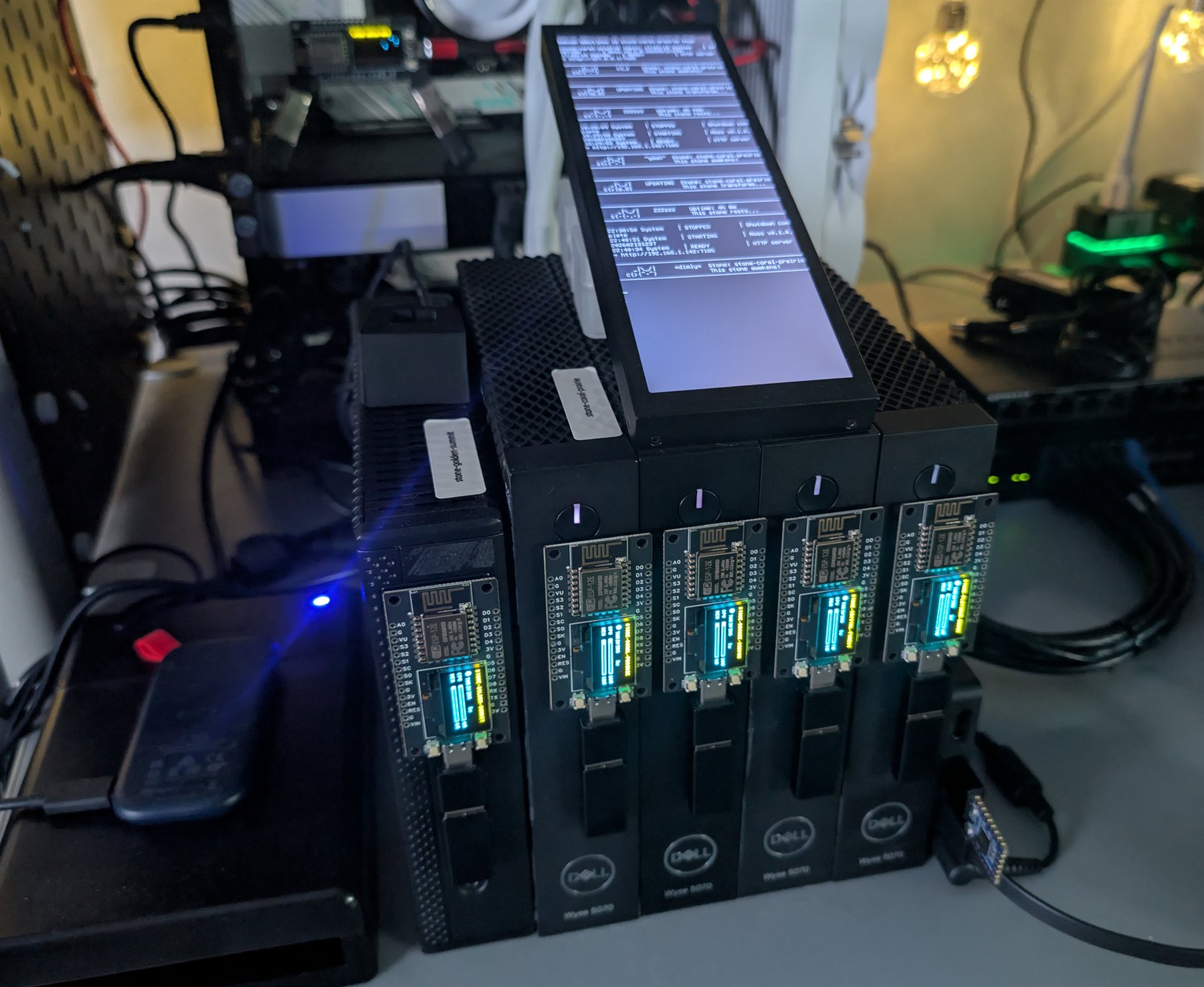
An operational Zen Garden on a workbench, with repurposed Dell thin clients, illuminated companion displays and a central status screen.
An operational Zen Garden test environment: repurposed thin clients and mixed hardware working as named Stones, with central status reporting and illuminated companions making the garden visible at a glance.

Is this your problem?

Reach for Zen Garden when
  • You have thin clients, retired PCs or other capable machines that should be useful instead of becoming e-waste.
  • You want a handful of self-hosted services without hand-maintaining container commands, ports and hostnames.
  • You value local ownership, comprehensible infrastructure and the freedom to replace individual machines.
Choose something else when
  • You need a managed service, contractual availability or commercial support.
  • You need production high availability, general cross-Stone state replication or automatic disaster recovery today.
  • You are operating a large, hostile multi-tenant estate that calls for enterprise orchestration and policy controls.

Useful hardware, tended as one garden.

Zen Garden starts with service intent, then carries that intent through placement, operation and discovery. The container is disposable; the offering name, configuration, data location, port and discoverability are what the garden remembers.

◆Machines become Stones
Retired PCs, thin clients and Raspberry Pis become named participants instead of e-waste. The garden is designed around replaceable hardware, not precious servers.
◆Services become offerings
A curated manifest expresses how a service should run. Moss negotiates hardware, storage and ports, then keeps the resulting runtime aligned with that intent.
◆Locations become answers
Applications and people ask for a service by what it is. Discovery supplies its current URI, and Koan can carry that intent as a zengarden:// resource.

What's inside

Curated offerings 51 checked-in service templates spanning databases, AI, networking, storage and more
Hardware negotiation compatibility, preferences, GPU capabilities and image fallbacks inform placement
Durable service intent persistent data paths and remembered ports survive managed-container recreation
Three service modes manage a Zen container, observe an existing service or publish an external one
Operational surfaces health, resources, logs, events, lifecycle commands and the Pulse terminal
Physical companions Cricket audio and Firefly displays give each Stone a voice in the room
Intent becomes infrastructure
spare machine -> named Stone -> offer manifest -> Moss -> running service -> connection URI

Moss tends the runtime on each Stone. Rake, scripts and agents inspect the same garden; Koan applications can resolve zengarden:// resources into current connection strings.

One experience, understood from every side

For the builder

One service-shaped request replaces a page of container, storage, port and discovery plumbing.

For the agent

Compact commands plus JSON and URI output keep infrastructure work legible and composable.

For the operator

Pulse, health, events, logs and visible companions make the garden observable in software and in the room.

For the inheritor

Named offerings and checked-in manifests preserve why a service exists after its original machine is gone.

Grow one useful thing

Once a Stone is running Moss, two commands turn service intent into something an application can use.

Ask the garden for MongoDB

$ garden-rake offer mongodb

Zen Garden evaluates the offering and hardware, creates durable storage, negotiates a usable port and starts the managed runtime.

Receive its connection URI

$ garden-rake find mongodb --format uri

Discovery returns where the service is now, without making the application remember which Stone hosts it.

Then watch the garden tend

Open the live terminal view when you want the whole garden in sight:

garden-rake pulse

Pulse makes Stones, offerings and current state visible without turning ordinary service use into an operations dashboard.

Know what you are adopting

  • Active development: the offering lifecycle, discovery, operations and companion surfaces are exercised on a real heterogeneous garden and are testable from source.
  • The current USB creator builds an unattended Stone installer, but a signed turnkey image or downloadable installer bundle is not published yet.
  • Moss can reconstruct a missing managed container on a surviving Stone. General cross-Stone state recovery, guarded update rollback and production high availability remain active work.
Prepare a first Stone →Inspect the offering lifecycle →Meet the companions →
Grow the first serviceView the source
Optional capability layer

A minute with Agyo

When a Koan application needs GraphQL, scheduling, vector search, RAG or another advanced capability, add that intent without introducing a second framework around the domain.

01

Name the capability

The reference says what the application needs. Agyo carries the recurring registration, lifecycle and provider mechanics.

02

Keep one application

Entities, hooks, configuration and business behavior stay in Koan's familiar grammar instead of splitting into another integration layer.

03

See what joined

Capabilities participate in Koan's startup and operational vocabulary, so optional composition can remain inspectable.

Is this your problem?

Reach for Agyo when
  • A Koan application needs an advanced capability without a parallel bootstrap, domain model or provider vocabulary.
  • A small application should gain something substantial without letting integration plumbing dominate its code.
  • Optional dependencies and their security cadence should remain outside Koan core until an application asks for them.
Choose something else when
  • The application is not built on Koan or the team wants zero framework coupling.
  • You need stable public packages, compatibility guarantees and a mature support ecosystem today.
  • You need durable distributed scheduling, a fully typed production GraphQL schema, or turnkey hosted RAG now.

Capability without a second architecture.

Agyo is where useful Koan-native capabilities can grow independently. Applications reference only what they need; the foundation stays lean and the resulting system stays recognizable.

◆Only when you ask
GraphQL, RAG, Vault, PGVector and other dependencies stay outside Koan core. The application references only the capability its next use case earns.
◆The same application grammar
Agyo joins AddKoan(), entities, hooks, configuration, health and startup reporting instead of creating another framework beside the application.
◆Independent by design
The one-way package boundary keeps Koan lean while optional capabilities move on the dependency, security and release cadence their job requires.

What's inside

Application interfaces GraphQL over Koan entities and duplex WebSockets exposed as .NET Streams
Application capabilities in-process scheduling, AI translation, canonical tagging and an OpenTelemetry baseline
Infrastructure adapters PostgreSQL pgvector search plus environment, configuration and HashiCorp Vault secret resolution
Intelligence toolkit RAG ingestion, provenance, retrieval, concept graphs, distillation, evaluation and corpus composition
Built with Agyo Librarian turns local repositories into cited code and documentation context over REST, UI and MCP
One application, optional reach
Koan application + chosen Agyo capability -> AddKoan() -> one composed runtime

Agyo depends on Koan's public packages; Koan never depends on Agyo. That one-way boundary keeps every capability optional and gives it an independent release and security cadence.

One experience, understood from every side

For the developer

Meaningful capability without integration sprawl: the remaining code stays about the application's work.

For the agent

More optional intent per token: a known package and one composition grammar replace invented wiring.

For DevOps

Optional operational weight with visible dependencies, health, provider choices and safe defaults.

For the architect

A controlled capability frontier that lets Koan remain coherent without becoming monolithic.

Follow Agyo toward V1

The capability source is implemented and testable today. Public package installation and compatibility guarantees are part of the V1 stabilization work.

Explore the current source

$ git clone --branch dev https://github.com/sylin-org/agyo-tools

The repository contains the libraries, focused tests, decisions and live surface ledger. Building currently requires compatible Koan packages in its local feed.

The V1 first result

Reference one published capability in an existing Koan app and run it through the same AddKoan() composition. GraphQL is the clearest target: existing entities gain /graphql and /graphql/sdl without a second domain model.

Know what you are adopting

  • Building toward V1: twelve library projects pack from source, the principal composition paths have focused tests, and Librarian demonstrates a substantial runnable service assembled from Agyo capabilities.
  • Not public yet: the first Sylin.Agyo.* NuGet release and a clean package-first onboarding path are still part of the V1 work. Follow the source now; do not treat package IDs or APIs as stable.
  • The boundaries are deliberate: scheduling is in-process, GraphQL typing is still limited, external AI/vector/Vault behavior needs its providers, and the full tool-using RAG retrieval loop remains future work.
Read the Agyo charter →Inspect the surface ledger →Trace the current tests →
View the current sourceRead the architecture decisions

What it actually does

Small, dependency-light Rust crates that each present one identical API over the platform-native mechanism beneath - the same operation, done the same way, on Windows, macOS and Linux. The first is os-truststore: it installs a root certificate into the OS trust store, where the established crates in this space only read from it.

The concept

The OS stands for Operational Symmetry. Most cross-platform libraries copy one platform's shape onto the others; os-tools writes a mirror for each instead - structurally symmetric, mechanically alien - and fills the missing corners one crate at a time. Today it is a family of one.

What's inside

os-truststore install or remove a root CA in the OS trust store - the symmetric writer the ecosystem was missing
Symmetric API the cert is the identity: install, is_installed, uninstall - idempotent, and it never panics
Three real backends Windows CryptoAPI, macOS Keychain, and a Linux update-ca / p11-kit orchestrator
In-process trust an optional rustls feature builds a root store with no OS changes and no elevation

What it is

A research canon, not software: an architecture paper, a glossary, a graded bibliography and a stack of decision records for how an artificial companion might remember, attend, and hold a coherent sense of self over time.

The concept

Hokora tries to model how a mind turns experience into understanding - consolidation during sleep, emotion tagged at the moment of encoding, a theory of mind that recurses - drawing its structure from neuroscience rather than from information retrieval. This repository is only the canon: every claim must trace to a real citation, and the software that would run it is deliberately elsewhere.

What it is

A paced-breathing companion built to be held rather than watched. A tuned, runnable prototype exists today; the shippable app does not yet.

The concept

Nagi inverts the breathing app: the screen is the afterthought. The intended experience is a phone held to your chest, eyes closed, that you feel and hear breathe until your own breath falls into step with it - one semantic model of a single breath driving visuals, sound and haptics that never talk to each other yet stay perfectly in tune.
Small, meaningful tools - no accounts, no telemetry, no cloud subscriptions. Yours to run and keep, locally. [email protected] · github.com/sylin-org · for agents